● ERIC T. MARAY / PORTFOLIO← BACK TO WORK
MENU ☰
✦ CASE STUDY / SAFETY SYSTEMS & DIGITAL WORKFLOWS

From Reporting
to Response.

Making safety easier to report, easier to understand, and harder to overlook.

Building a more accessible safety-reporting experience, then connecting it to a broader vision for environmental, health, and safety operations.

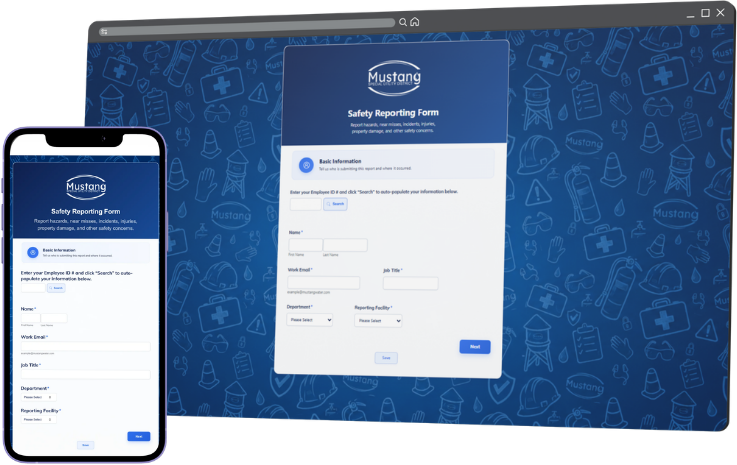
Safety Reporting Form interface concept, including employee-ID search, basic information fields, department and facility selections, and Save and Next controls
Safety Reporting Form — project design screenshot; identifying information and live employee submissions are not shown.

A reporting system only works when people use it.

Safety reporting had been distributed across multiple forms and processes. That made an already-sensitive task feel more administrative than helpful, particularly when people needed to report a hazard, near miss, injury, incident, or property damage quickly.

I approached the problem as more than a form redesign: how could one familiar entry point make reporting accessible across the organization, improve the quality of information captured, and support more timely follow-through?

6 → 1DESIGN GOAL: CONSOLIDATE SIX REPORTING FORMS INTO ONE ADAPTIVE EXPERIENCE
EveryoneDESIGNED FOR EMPLOYEE ACCESS, NOT JUST A LIMITED GROUP OF FORM USERS

The six-to-one figure describes the consolidation strategy developed for the new form, not a verified count of fully retired legacy workflows.
THE DROP: a simpler way to speak up.

The Safety Reporting Form — promoted through the internal THE DROP experience — was designed to capture different kinds of events without making every employee navigate every possible question.

Accessible entry

Direct link and QR-code access to the form, with the intranet offering a familiar starting point for employees.

Less repetitive typing

An employee-ID lookup designed to populate known identifying information, with manual entry when a match was unavailable.

Adaptive questions

Event type, date, time, and location guide follow-up questions so reports collect the details relevant to the situation.

Useful evidence

Event information and supporting details create a stronger basis for supervisor review, safety follow-up, and trend analysis.

The design principle: reduce the effort required to report a concern without reducing the quality of information needed to act on it.

Designing for what happens next.

The form was designed as an easier point of entry, but the operating process had to begin earlier and continue further. A supervisor-focused reporting and response guide developed with the Risk & Benefits Analyst emphasized immediate care, prompt notification, the minimum information needed to act, and continued support through recovery. Reporting should enable that response—not delay it.

01 / PRIORITYCare first

Make the scene safe and arrange necessary assistance before administrative steps.

02 / NOTIFYSpeak up promptly

Alert the supervisor and Risk & Benefits so the appropriate response can begin.

03 / DOCUMENTCapture what is known

Record essential details without waiting for a complete investigation.

04 / FOLLOW THROUGHSupport & learn

Coordinate care, corrective action, follow-up and a safe return to work where relevant.

Adapted from the jointly prepared supervisor reporting-and-response toolkit. This sequence represents operational guidance, not a claim that each step was automatically orchestrated through the software.

This is a simplified project workflow, not a claim that every stage was automatically integrated or fully deployed.

The 2026 Accident Reporting & Response Process toolkit was co-prepared with Megan Queen, Risk & Benefits Analyst. It documents the existing FastField/manual reporting options at that time and is cited here for the response philosophy—not as proof that the Jotform replacement had been adopted organization-wide.

Building the foundations of an EHS system.

As reporting evolved, I began developing a broader safety-management platform that would bring related work into a more coherent environment: a dashboard for visibility, job safety analysis (JSA) management, reporting, and a separate field-assessment experience for managers and safety staff.

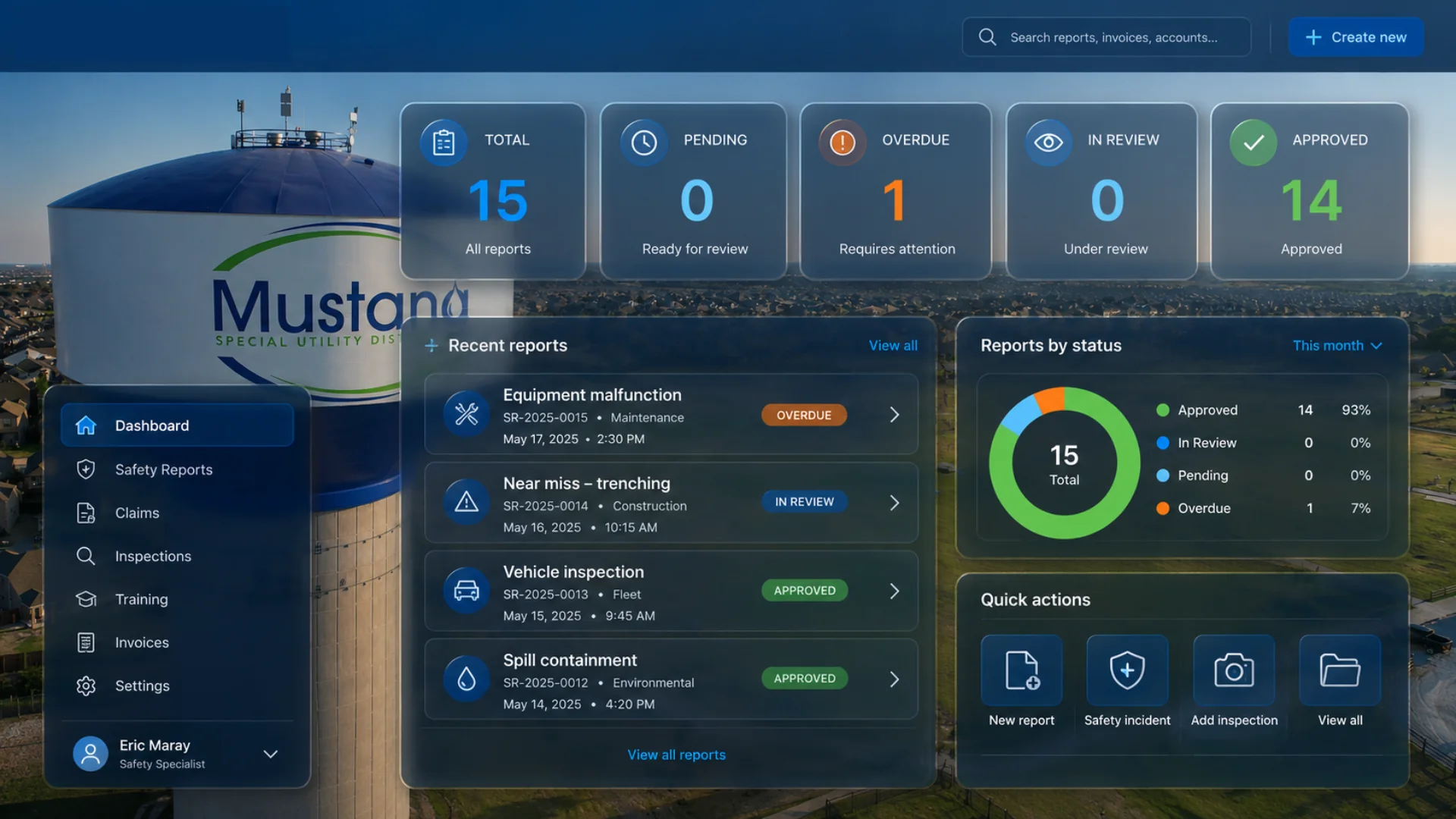
Conceptual EHS dashboard with reporting-status cards, recent reports, status distribution, navigation, and safety quick actions
EHS dashboard concept. An exploratory design for bringing reporting, review status, field activity and follow-up into one workspace. The figures and example reports shown are illustrative mockup data—not operational performance metrics. Click to enlarge.
DELIVERED COMPONENT

Jotform reporting

The redesigned reporting experience improved the way employees could submit safety information and how structured data could be collected.

OPERATIONAL FOUNDATION
PLATFORM DEVELOPMENT

EHS workspace

Dashboard visibility, JSA processes, assessments, and a wider safety-information environment remained under development rather than a fully finished product.

PARTIALLY DEVELOPED
ADJACENT WORK / FIELD OPERATIONS

Connecting the desk and the job site.

The developing safety system was informed by related field-work practices: job safety analyses, supervisor observations, hazard-and-control checks, near-miss and “good catch” capture, and documented follow-up. These appeared in a separate draft field operations guide; they were design inputs and adjacent workstreams, not evidence that every module was deployed within the EHS platform.

JSA & HAZARD CONTROLSFIELD OBSERVATIONSGOOD CATCHESSUPERVISOR REVIEW

Microsoft 365 applications and Power Automate were part of the broader workflow and integration approach. The available project records do not establish which specific automations were deployed, so this case study distinguishes the platform architecture from proven production integrations.

JOTFORMMICROSOFT 365POWER AUTOMATE / WORKFLOW DESIGNSAFETY REPORTINGJSA MANAGEMENTFIELD ASSESSMENTS

From collecting reports to creating visibility.

The completed reporting work provided a more accessible route for raising concerns, with a consolidated design and more intentional data capture. The wider EHS platform advanced as a developing system rather than a fully completed rollout.

The financial case also mattered: replacing the legacy FastField approach was estimated to offer substantial annual savings, but that figure was a projection, not verified realized savings. I chose not to present it as an achieved financial outcome.

What the project demonstrates: experience design, low-friction employee access, conditional form logic, workflow thinking, data structure, and the ability to connect safety culture with practical digital systems.

A form can capture an event. A well-designed system can make it easier for people to speak up, help others respond, and reveal what the organization needs to learn.

← EXPLORE MORE WORK